


Yahoo Mail: Email & Planner
4.1592.85K Reviews
App Specs
- Version
- Varies with Device
- Updated On
- License
- Free
- Downloads
- 100,000,000+
- Developer
- Yahoo
- Categories
- Communication
- Platform
- Android, iOS
Screenshots

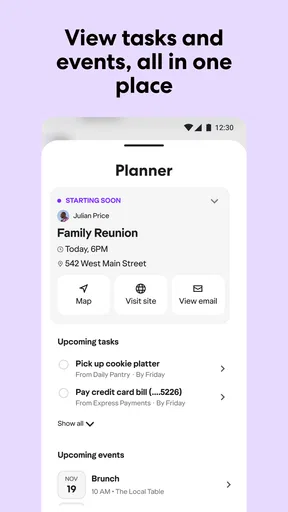
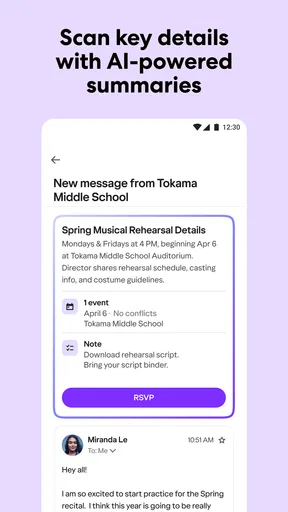
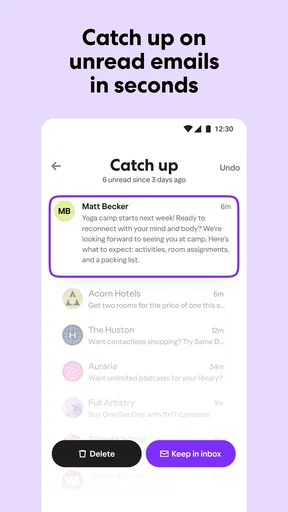
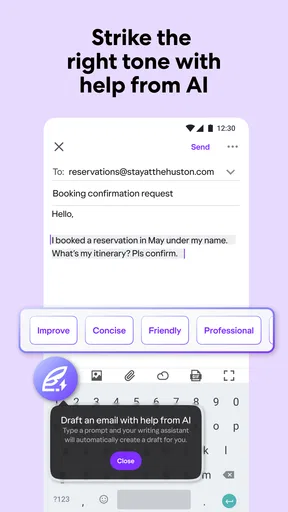
 Analysis by AppCompare
I judge an email app less by how polished its inbox looks than by how clearly it lets me understand and manage access to my account. Yahoo Mail is a communication app from Yahoo, and its long history makes it a familiar choice for people who have kept a Yahoo address over the years. Familiarity is useful, but I would still treat any inbox as a place where sensitive conversations and account-recovery messages can land, and make deliberate choices about how I secure it.
Trust starts with the account you use
Yahoo Mail is free to download, is rated for Everyone, and includes optional in-app purchases priced from $0.99 to $9.99 per item. It has an average rating of 4.3 from around 8.4 million ratings, with more than 100 million installs. Those figures suggest a widely used app, not a personal guarantee about privacy or security. I would not use popularity as a substitute for checking the account settings and sign-in options that are actually available to me.
In my experience, the practical trust question is often less dramatic than “Can I trust email?” and more specific: which account am I adding, which notifications am I allowing, and what happens if I lose access to my phone? Yahoo Mail’s account controls matter most when I answer those questions before relying on it for important mail. If I use the app for work as well as personal messages, I also keep in mind that convenience does not erase the need to follow any workplace rules about where business email belongs.
Guides and Analysis on Yahoo Mail: Email & Planner
Sign-in controls are worth setting up carefully
The published article’s account-key and two-step verification details point to useful choices for protecting sign-in. Account Key is described as a phone notification used to approve a login instead of entering a password, while two-step verification adds another checkpoint. I would choose the method that fits my habits and recovery plan, rather than enabling a feature and assuming the job is done. A phone-based approval can be convenient, but access to that phone becomes especially important.
Before changing sign-in settings, I would make sure the recovery options for the Yahoo account are current and that I can reach them if my main device is unavailable. This small bit of preparation can prevent a frustrating lockout later. I also avoid approving an unexpected sign-in prompt: if I did not just try to log in, I would pause and check the account rather than tapping through automatically. The useful principle is simple: an extra sign-in step only helps when I recognize the request and can recover the account.
These controls do not make every message private from every possible risk, and I would not treat them as a replacement for careful handling of attachments or links. For sensitive conversations, I check who sent the message and whether the request makes sense before opening a file or sharing information. That habit is relevant in any mail app, but it matters particularly when an inbox is used for password resets, bills, travel details, or personal documents.
Notifications and account choices affect daily privacy
Personalized notifications can make the inbox less distracting by limiting which messages interrupt me. I find that most useful when I am expecting something time-sensitive but do not want every routine message to pull my attention away. It is also a privacy choice: a notification can appear where someone nearby might see it. I would review notification settings on the phone as well as in the app, and choose a level of detail that suits where I usually use the device.
Worth Reading Before You Choose

Switching to Android Auto Means Rethinking Your Driving Routine

Google Calendar Makes a Crowded Week Easier to Manage

Ludo King Makes the Most of the Minutes Between Plans

Baby Panda World Brings Quick Play to Modern Phones, but Its Game Library Feels Busy

ESPN’s Live Game View Makes Following Close Games Easier

QuizzLand Review: A Good Fit for Short Trivia Breaks, Not Every Player
Managing multiple email accounts in one place is convenient if I move between personal and work inboxes. The trade-off is that a single app can put several parts of my email life close together, so I need to pay attention to which account is selected before sending. For a quick reply, I check the sender address and recipient line first. That extra glance is especially worthwhile when switching between accounts, because a familiar compose screen can make it easy to send a personal note from a work address—or the reverse.
I also think about who else can access the device itself. If a phone is shared, left unlocked, or used by children, the protection offered by an account sign-in method is only one piece of the picture. A notification preview or an already-open inbox may reveal more than I intend. I would use the device’s own lock and keep the app closed when handing the phone to someone else, rather than relying on the email account’s login controls to cover every situation.
Using the inbox without creating extra work
I use this section to focus on a small routine that keeps everyday email manageable: search with a sender or subject clue, then check the message itself before acting. That approach is especially useful when I’m looking for a booking or receipt in a busy inbox, and it helps me move quickly without treating a search result as the whole story.
A practical routine for finding and handling mail
Ever found yourself stuck in an endless loop of emails, trying to sort through the chaos? Yeah, me too. Enter Yahoo Mail, the trusty old pal that’s been around since the dawn of email time. But is it still worth your time and attention in today's fast-paced world? Let’s dive into what makes this app tick.
First Impressions
Opening up Yahoo Mail feels like meeting an old friend. The interface is clean and straightforward, which is a breath of fresh air compared to some of the other cluttered apps out there. It’s got that classic blue and white theme that’s easy on the eyes, and navigating through your inbox is a breeze.
Features That Stand Out
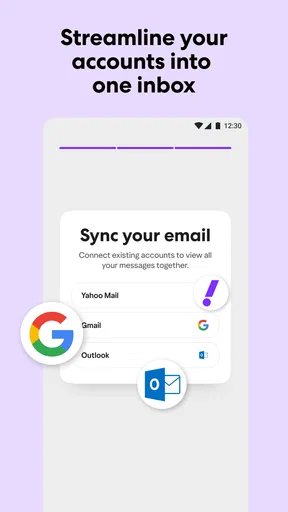
One thing that caught my eye is the customizable themes. You can switch things up and add a bit of personality to your inbox, which is a nice touch. Plus, the app allows you to manage multiple email accounts from one place. So, if you're juggling work, personal, and that random old account you made in high school, you’re covered.
Another cool feature is the smart search. It’s super fast, and finding that one email from months ago is a piece of cake. Just type in a keyword, and boom, there it is. The app also offers personalized notifications, so you only get pinged for the emails that matter.
Search is most helpful when I give it a clue I can remember: a sender’s name, a subject phrase, or a distinctive word from the message. If I am looking for a receipt, for example, I try the shop name or a term likely to appear in the subject rather than scrolling through weeks of mail. That is a small workflow change, but it turns search into a practical retrieval tool instead of a last resort.
For multiple accounts, I would decide which inbox is the default place for each kind of message and keep a momentary check before sending. That makes the app more useful for someone maintaining an older Yahoo address alongside a current personal account. It is less compelling for a person who wants every message sorted into a detailed project system; an email client built around extensive labels, rules, or task management may suit that workflow better.
Performance and Usability
When it comes to performance, Yahoo Mail doesn’t disappoint. It’s quick to load, and I didn’t notice any lag while switching between emails or folders. The spam filter works like a charm, too. It’s like having a personal email bouncer, keeping the riff-raff out. Plus, the app’s integration with services like Dropbox and Google Drive makes attaching files a walk in the park.
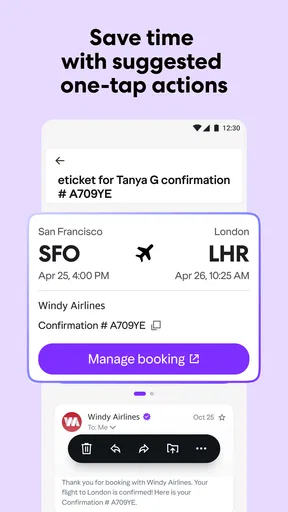
For an everyday scenario, imagine I am heading out and need to find a booking confirmation while also replying to a family message. I can search for the booking details, switch to the relevant inbox if I manage more than one account, and use a notification to spot a message that needs attention. When attaching a document from a connected cloud service, I still check the recipient and file before sending; making an attachment easier does not make a mistaken share impossible.
That workflow also shows where I would slow down. A quick search is convenient, but opening the message and checking its sender and context is safer than acting on a subject line alone. Likewise, a spam filter helps reduce unwanted mail but cannot make every suspicious message harmless. I treat unexpected requests for account details, payment, or urgent action with caution, even when they arrive in an otherwise familiar inbox.
Compared with the usual alternatives, Yahoo Mail’s strongest case is a straightforward place to manage a Yahoo address, with the added convenience of handling multiple accounts. If I already use another email provider’s app and prefer its organization or account ecosystem, switching may add little. If I need a highly specialized professional workflow, I would compare the available tools in that service before moving. For everyday personal mail, though, a familiar interface and search can matter more than a long list of advanced options.
Where it fits—and where I would look elsewhere
I would recommend trying Yahoo Mail if you already have a Yahoo account, want an approachable mobile inbox, or need to check several accounts without constantly moving between apps. Its customization is a nice personal touch, while search and notifications address everyday problems: finding an old message and noticing the one that needs a reply. Yahoo released the app on June 22, 2010, and its continued presence makes it a recognizable option for people whose email habits span many years.
I would be more cautious about recommending it to someone who wants email to double as a full task manager, who needs a very particular work-approved setup, or who strongly prefers to keep different accounts in separate apps. Keeping accounts together saves switching, but separation can make boundaries clearer. That is a personal trade-off, not a universal advantage: I would choose the setup that makes it easiest for me to send from the right address and keep sensitive work in the right place.
Another useful habit is to decide how much interruption I actually want before turning on alerts. If I receive a high volume of routine messages, broad notifications can recreate the very distraction I hoped the app would solve. I would start with alerts limited to the messages I consider important, then adjust if I find I am missing something. The right setting depends on my inbox and schedule, not on a one-size-fits-all idea of being constantly reachable.
Security and Privacy
Let’s talk security. In today’s world, it’s a big deal. Yahoo Mail offers account key, which is a nifty feature that allows you to log in without a password. It sends a notification to your phone for verification. And yes, you’ve got your standard two-step verification to keep things locked down tight.
My main practical takeaway is to pair those sign-in choices with ordinary care: keep recovery details usable, protect the phone, and pay attention to approval prompts. I would also avoid treating a mail app as a secure vault for every sensitive item simply because it offers extra login checks. Those checks protect access to the account; they do not remove the need to consider what I send, which files I attach, and who can see a notification on my screen.
Wrapping It Up
So, is Yahoo Mail worth it? If you’re looking for a reliable, easy-to-use email app with some nice customization options and solid security features, then absolutely. It might not have all the bells and whistles of some newer apps, but sometimes, sticking with a classic isn’t a bad choice. Give it a whirl; it might just become your new favorite inbox buddy.
My recommendation is a measured one: Yahoo Mail makes sense when the account and the simple, familiar way of checking it are what you need. I would try it for routine personal correspondence, tune notifications to avoid needless interruptions, and set up sign-in and recovery thoughtfully before depending on it for important mail. If those choices fit your habits, it is an easy app to keep within reach; if you need stricter separation or a more elaborate mail workflow, another client may be a better match.
Pros
- User-friendly interface with intuitive navigation.
- Offers 1TB of free storage for emails.
- Powerful search functionality for quick access.
- Customizable themes for a personalized look.
- Integrated with Yahoo News and Calendar.
Cons
- Ads can be intrusive without a paid plan.
- Limited third-party app integrations.
- Occasional syncing issues with other devices.
- No built-in task management feature.
- Lacks end-to-end encryption for emails.
FAQs for Yahoo Mail: Email & Planner
Is Yahoo Mail available for both Android and iOS devices?
Yes, Yahoo Mail is available for both Android and iOS devices. You can download it from the Google Play Store for Android users and the Apple App Store for iOS users. The app offers a seamless experience on both platforms, ensuring you can access your emails on the go, no matter your device.
What features does Yahoo Mail offer to enhance email management?
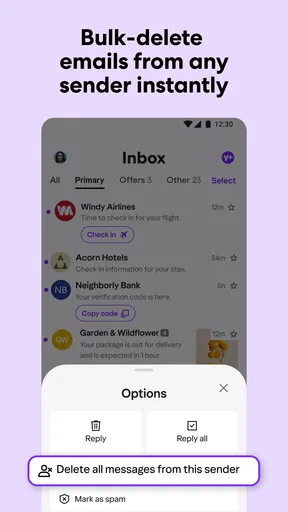
Yahoo Mail provides a variety of features to enhance email management, including customizable themes, multiple inbox views, and the ability to connect other email accounts. It also includes powerful search capabilities, spam filtering, and organizational tools like folders and labels to keep your inbox tidy and organized.
How secure is Yahoo Mail in terms of protecting my personal information?
Yahoo Mail prioritizes the security of your personal information with features such as SSL encryption, two-step verification, and account recovery options. These measures help protect your account from unauthorized access and ensure that your emails and personal data remain secure.
Does Yahoo Mail support integration with other services and apps?
Yes, Yahoo Mail supports integration with a variety of services and apps. You can sync your Yahoo Mail with other email providers like Gmail and Outlook, and it offers compatibility with calendar apps, cloud storage services, and more. This makes managing your digital life more streamlined and efficient.
Are there any ads in the Yahoo Mail app?
The Yahoo Mail app is free to download and use, which means it does include ads. However, for users who prefer an ad-free experience, Yahoo offers a premium subscription that removes ads and provides additional features, such as priority customer support and more storage space.


